Programme Analysis Support

XER
Inspector

Bridging the gap between commercial management and programme analysis. A decision-support tool that helps commercial teams understand programme impacts, develop Compensation Event scenarios and prepare programme information for review by planning professionals.

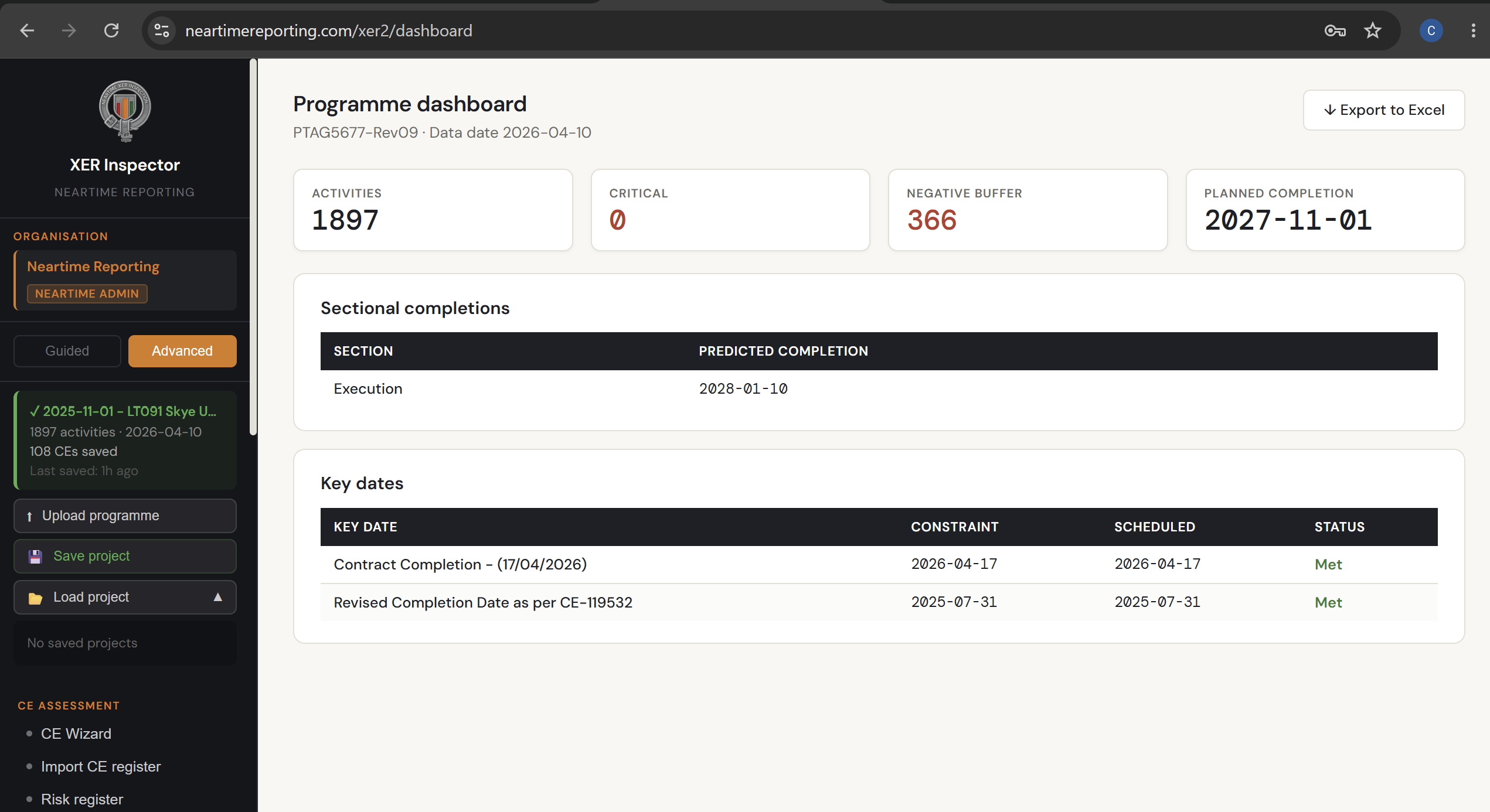
Programme Dashboard
Activities
1,897
Critical
0
Negative Buffer
366
Planned Completion
2027-11-01
Key Dates
Contract Completion — 17/04/2026Met
Revised Date — CE-119532Met
When you need programme input and can't wait for the planner

On most projects, planning resource is finite. When Compensation Events need to be progressed — and they usually need to be progressed quickly — commercial teams are often left choosing between waiting for planner time that isn't available, or asserting programme impact without the analysis to back it up.

Neither is a good position to be in.

XER Inspector gives commercial managers a way to do more of the initial groundwork themselves. Upload your Primavera P6 programme, explore how a CE lands on the schedule, build scenarios and understand the programme picture before the planner gets involved. The planner then gets a developed starting point rather than a blank sheet of paper.

It supports planning judgement. It doesn't replace it.

Developed by a practising commercial manager from a problem encountered on a live NEC infrastructure project.

Open XER Inspector
XER Inspector CE Wizard

From single CE to full cumulative TIA

Six core workflows cover the full range of NEC programme-based assessment, from a quick individual CE to a complete multi-event time impact analysis.

CE Wizard

A guided, step-by-step assessment for any individual Compensation Event. Break a CE into its constituent activities, see exactly how it lands on the programme, and generate a fully formatted CE Quotation — ready to issue.

Scenario Builder

Build "what-if" programme scenarios by applying corrections and CEs together, then visualise the result on a baseline-vs-revised Gantt chart. Save, reload, duplicate and compare scenarios as positions evolve.

Cumulative TIA

Assess multiple Compensation Events together, in sequence, against a single corrected baseline — the NEC/SCL-recognised methodology for demonstrating genuine cumulative effect and flagging concurrent delay.

Scenario Comparison

Set two assessed positions side by side — for example, the Contractor's case against the Project Manager's — and see precisely where and why the analysis diverges.

Programme Drift Analysis

Compare two actual programme revisions to track how the contractor's plan has genuinely changed over time, independent of any specific event.

Retrospective Analysis

Reconstruct historic programme positions and assess delay after the fact, with a guided correction and mapping workflow for retrospective claims.

More than a spreadsheet. Less than a full planning review.

XER Inspector sits in the space between a back-of-envelope estimate and a full planner-led analysis. It gives commercial teams enough rigour to develop a position, identify the key programme questions, and give a planner something meaningful to validate.

Live P6 programme analysis

Upload your .xer file directly and run full Critical Path Method scheduling — no manual re-entry, no separate planning software required.

Sectional completions & Key Dates

Full support for multi-section NEC contracts, with separate completion tracking per Section and automatic flagging when a scenario causes a Key Date to be missed.

Activity register & programme dashboard

Full activity-level visibility with float, criticality and Excel export, plus a live programme health overview showing critical paths and negative buffer.

Contract-ready report output

Generate NEC-formatted reports — CE impact, TIA, programme acceptance, scenario summary — suitable for direct inclusion in a quotation or claim.

Concurrent delay flagging

The Cumulative TIA workflow isolates which events drove the Completion Date, which were absorbed by float, and flags potential concurrent delay for review.

Guided or advanced workflow

Switch between a guided step-by-step wizard for quick assessments, or an advanced mode for full control over programme corrections and scenario logic.

See XER Inspector in action

Screens from the live XER Inspector platform. Get in touch to arrange a full walkthrough.

XER Inspector programme dashboard
Programme Dashboard

Live overview of the uploaded programme — activity count, critical activities, negative buffer, sectional completions and Key Date status at a glance.

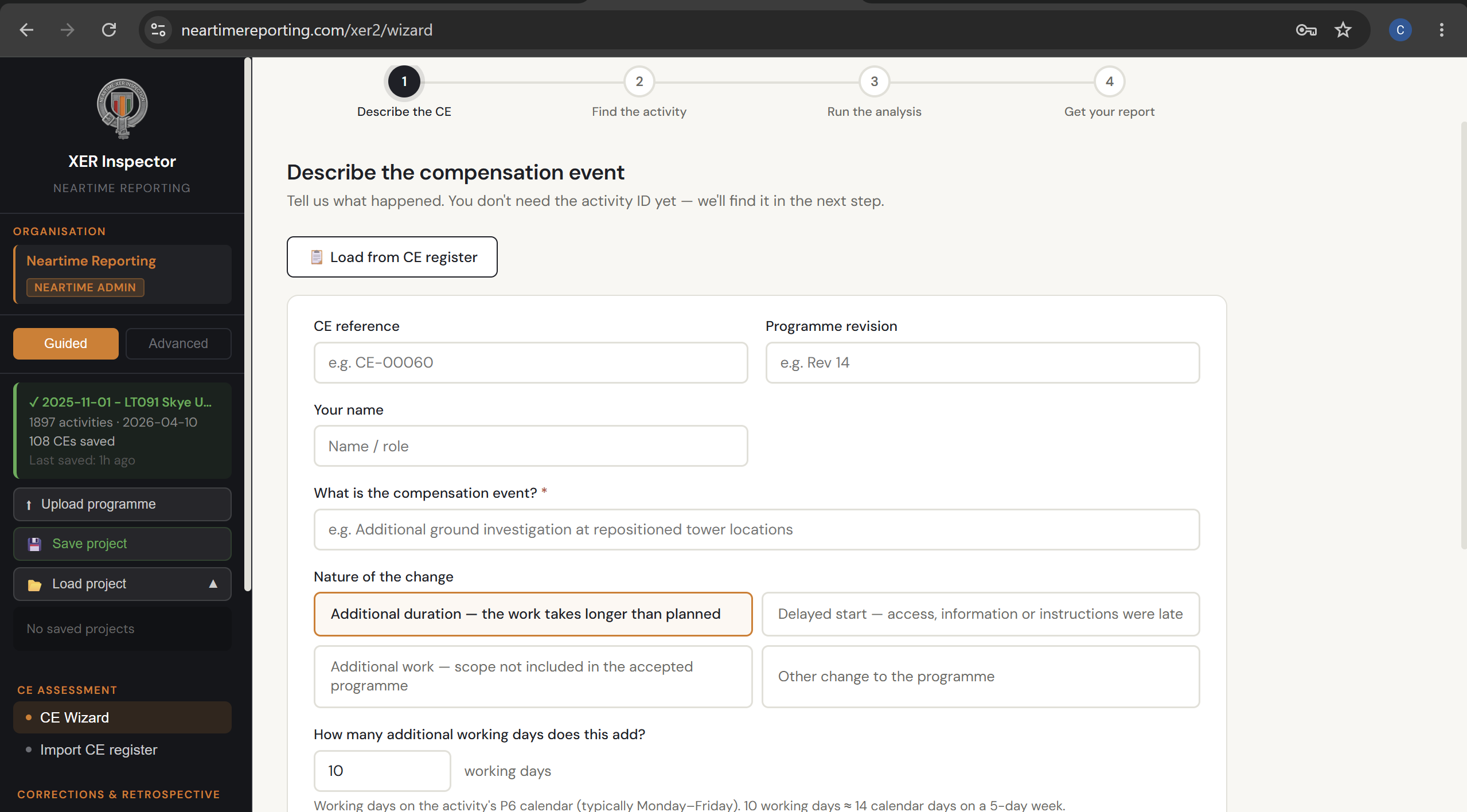
XER Inspector CE Wizard
CE Wizard

Guided four-step assessment — describe the compensation event, find the affected activity, run the analysis, and get your formatted report.

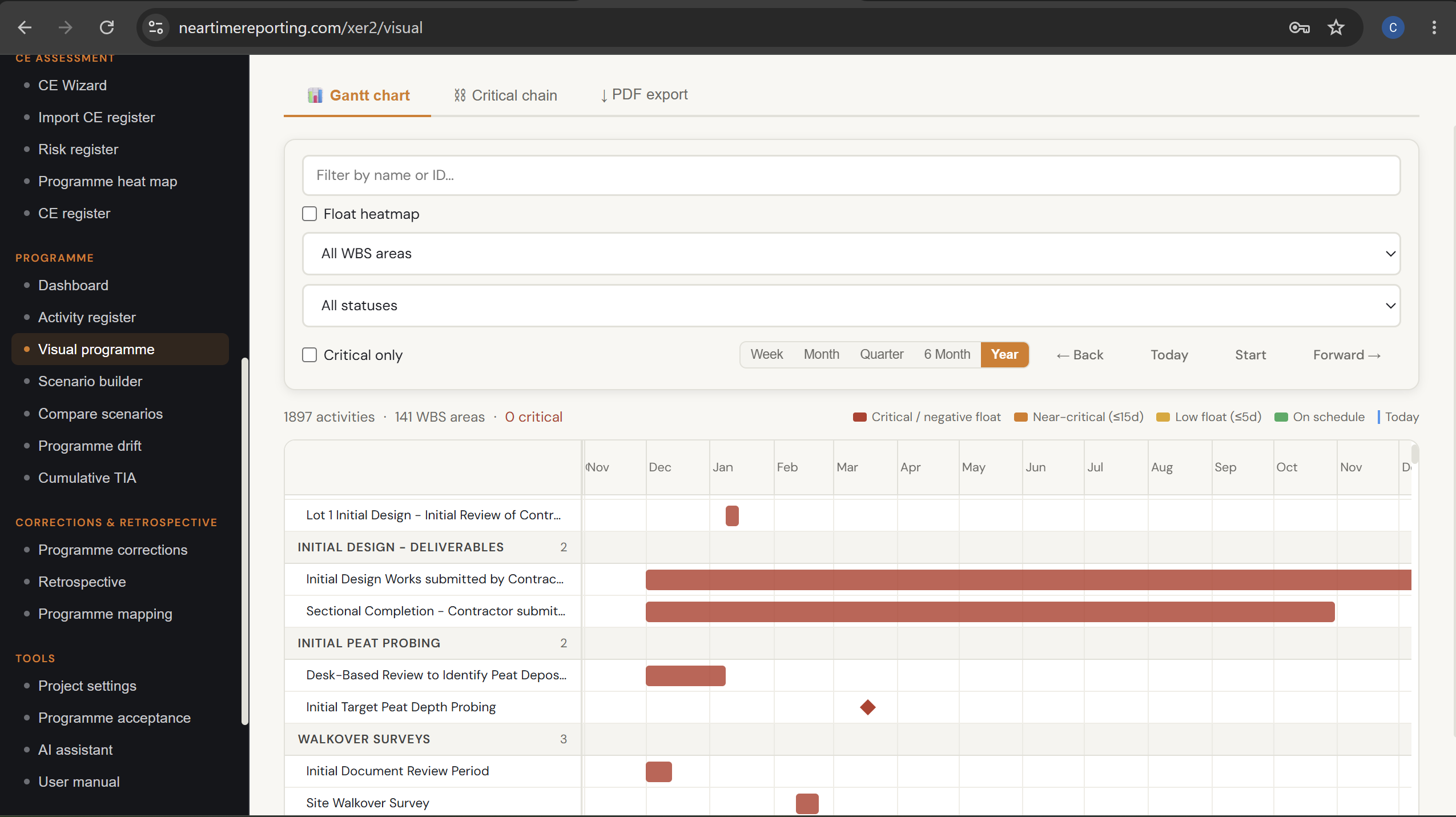
XER Inspector visual programme Gantt chart
Visual Programme & Gantt Chart

Full Gantt chart view with criticality colour-coding, float heatmap, WBS filtering and critical chain analysis across the entire programme.

← Swipe to see more →

Have a Compensation Event you'd like to test it against?

We're looking for live project applications where XER Inspector can support commercial teams with programme assessment. If you have a CE you'd like to put through it, get in touch.